🚛 Mercedes EPS2 (GS II) Gear Control Learning Process – Step-by-Step Guide
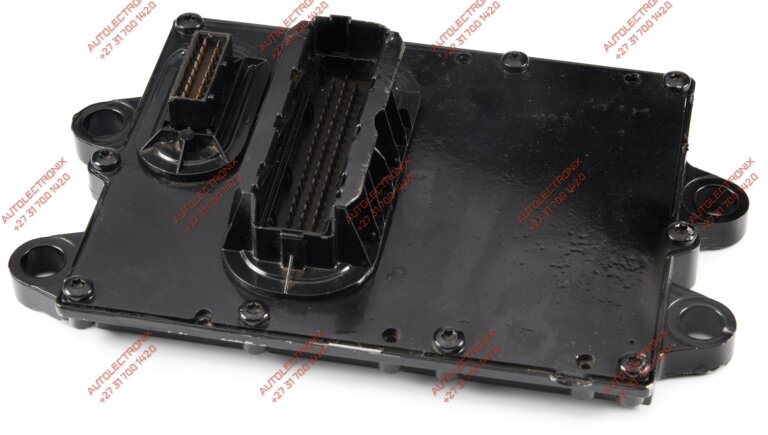
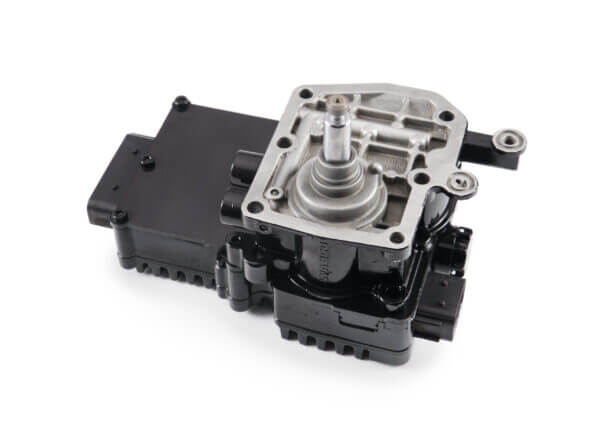
Mercedes EPS2 Gear Learning Process procedures are required after repairs, replacements, or adjustments to the EPS2 (GS II) Gear Control Module used in Mercedes-Benz trucks such as Actros, Atego, and Axor.
This learning process may also be required after engine power (horsepower) changes performed via MR/PLD programming, as torque characteristics and shift parameters must be re-synchronised between the engine management system and the EPS2 gearbox controller.
🚛 Mercedes EPS2 Gear Learning Process – Minor Learning (GS II)
This Mercedes EPS2 Gear Learning Process (Minor Learning) is required when replacing clutch-related components or position sensors for clutch, splitter, range, gear, or gate.
Preparation (Before Starting Learn Process)
✅ Ensure the parking brake is engaged (must be visible on the dashboard).
✅ Battery voltage must be stable (>24V).
✅ Clear any existing faults in the control unit before starting.
✅ Ensure air pressure is at full operating pressure.
✅ Both the cab harness (White Plug) and the gearbox harness (Black Plug) must be fully connected and locked into place using the locking mechanism on the plug.
✅ Do not use silicone, cable ties, or any other method to hold the plug in place, as this will compromise proper operation.
✅ When we return an EPS2 unit after repair, we will provide you with two O-rings for the splitter seal from the EPS2 to the gearbox.
✅ Do not use silicone on these seals, as it may cause blockages within the EPS2 and lead to a “GSII 10 Learning Error.”
Step-by-Step Process:
- Switch off the ignition.
- Engage the parking brake.
- Fully depress the clutch pedal and hold (skip this for EAS vehicles).
- Press and hold the “Neutral” button.
- Switch on the ignition.
- Wait for the “Neutral (N)” indicator to flash on the display.
- Release the clutch when you hear signal tone 1 (skip this for EAS vehicles).
- Fully depress the clutch when you hear signal tone 2 (skip this for EAS vehicles).
Completion:
- If the “Neutral” indicator appears, the process is successful.
- If flashing arrows appear, the learning process is still in progress.
- If programming fails, check for fault codes and repeat the process.
🚛 Mercedes EPS2 Gear Learning Process – Major Learning (GS II)
This Mercedes EPS2 Gear Learning Process (Major Learning) is required when replacing the EPS2 control unit, installing a different transmission, or after retrofitting a Telma retarder.
Preparation (Before Starting Learn Process)
✅ Ensure the parking brake is engaged (must be visible on the dashboard).
✅ Battery voltage must be stable (>24V).
✅ Clear any existing faults in the control unit before starting.**
✅ Ensure air pressure is at full operating pressure.
✅ Both the cab harness (White Plug) and the gearbox harness (Black Plug) must be fully connected and locked into place using the locking mechanism on the plug.
✅ Do not use silicone, cable ties, or any other method to hold the plug in place, as this will compromise proper operation.
✅ When we return an EPS2 unit after repair, we will provide you with two O-rings for the splitter seal from the EPS2 to the gearbox.
✅ Do not use silicone on these seals, as it may cause blockages within the EPS2 and lead to a “GSII 10 Learning Error.”
⚠️ Important Note – Parking Brake Status (P Symbol)
When performing the Mercedes EPS2 Gear Learning Process, the parking brake must be correctly recognised by the vehicle, not just mechanically applied.
The “P” symbol must be visible on the instrument cluster before starting the learning procedure.
If the P symbol is not displayed, the EPS2 learning process will not start or will fail, even if the parking brake is physically engaged. This condition usually indicates:
-
A fault in the Rear / Heck Module
-
A problem in the parking brake signal circuit
-
A vehicle-side CAN communication issue
-
Incorrect brake status input to the GS II / EPS2 system
If the P symbol does not appear, the fault must be diagnosed and resolved before attempting the learning process, otherwise repeated learning failures or fault codes will occur.
Step-by-Step Process:
- Switch off the ignition.
- Engage the parking brake.
- Fully depress the clutch pedal and hold (skip this for EAS vehicles).
- Press and hold the “Skip-Shift” button and “Neutral” button.
- Switch on the ignition.
- Release the clutch when you hear signal tone 1 (skip this for EAS vehicles).
- Fully depress the clutch when you hear signal tone 2 (skip this for EAS vehicles).
- Start the engine when the “Neutral (N)” indicator flashes.
- Release the clutch when you hear signal tone 3 (skip this for EAS vehicles).
- Fully depress the clutch when you hear signal tone 4 (skip this for EAS vehicles).
- Release the clutch when you hear signal tone 5 (skip this for EAS vehicles).
- Fully depress the clutch when you hear signal tone 6 (skip this for EAS vehicles).
Completion:
- If the “Neutral” indicator appears, the process is successful.
- If programming fails, check fault codes and repeat the process.
- If an error occurs, the fault code will be displayed on the instrument cluster.
💡 Notes:
- For vehicles with EAS, the clutch operates automatically, so clutch pedal actions can be ignored.
- During learning, always depress the clutch fully and release smoothly to prevent damage.
- If the process fails, inspect wiring, sensors, air supply, CAN communication, and harness connections before attempting again.
🔧 EPS2-Related Repairs & Connectors
-
Mercedes Actros GS Unit Repair – 5 Proven Fixes for MP2/MP3 Gear Selection Faults
-
MP2 MP3 Shift Cylinder Repair | Mercedes-Benz GS240 GS330 GS281 GS211
-
Mercedes Actros MP2 MP3 Heckmodule Repair – Rear Module Fault Fix Service
-
Mercedes-Benz MP2 MP3 GS240 GS330 GS281 GS211 Gearbox Harness Plug (Big Plug)
⚠️ Disclaimer
Autolectronix takes no responsibility for the accuracy of the above information. If you have any hesitations regarding installation or the learning process, please consult a qualified auto-electrician.
This Mercedes EPS2 Gear Learning Process guide is intended for workshops, technicians, and fleet operators working on GS II transmissions. Following the correct Mercedes EPS2 Gear Learning Process helps prevent shift errors, fault codes, and unnecessary EPS2 failures after repairs.